White Label
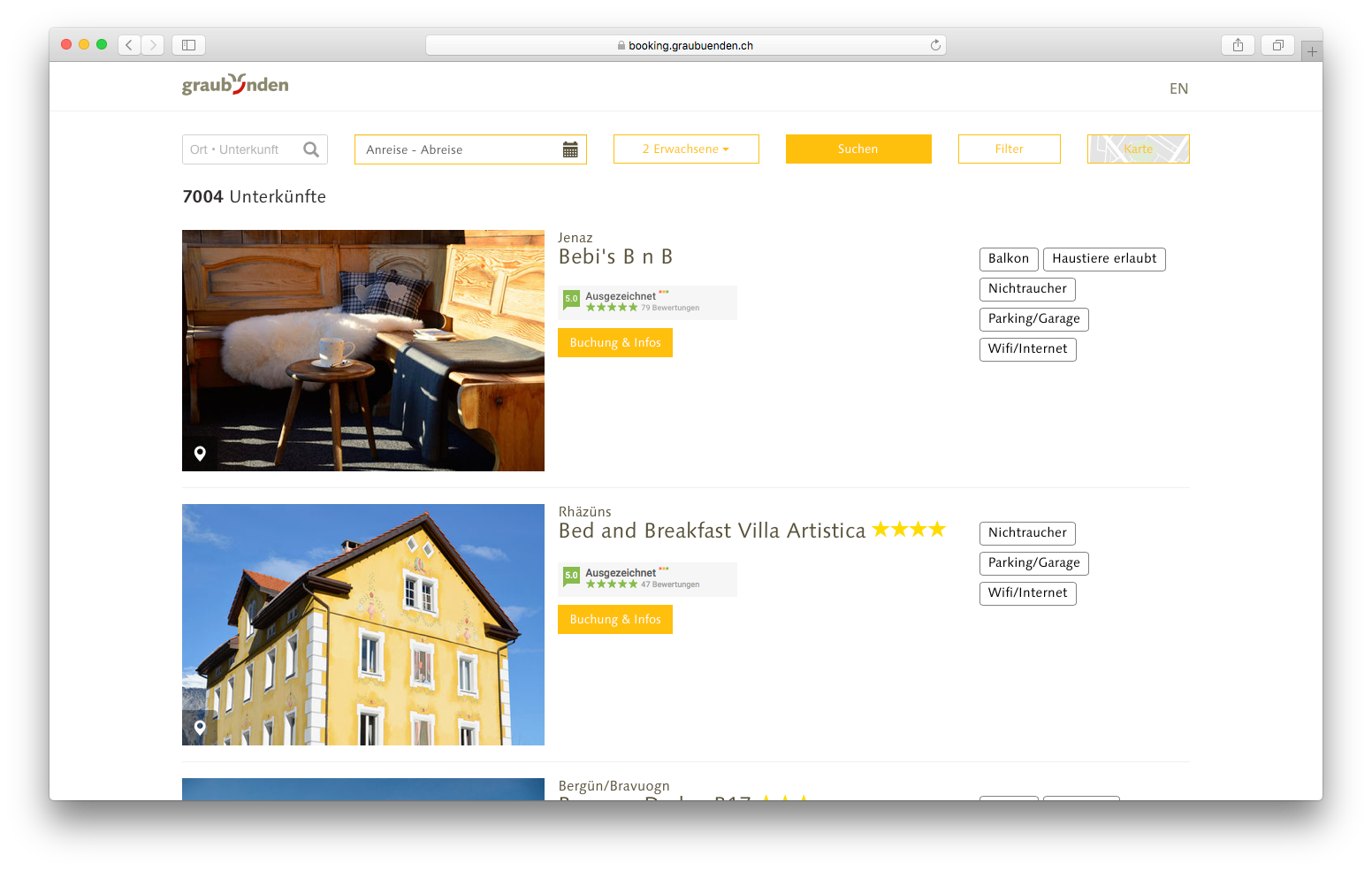
Use our White Label
Advantages
- Zero additional expenses with new offer types or booking provider
- Zero additional expenses with new regions
- Zero expenses for continuous development
- Ready for use within a few hours
- Latest features are added to the OpenBooking whitelabel first
- Occupancy calendar included by default
- Export stock data to your CRM for free
- Implementation in minutes and at no costs
- Real-Time search and autosuggest included
- Customize the whitelabel to your visual needs or CI
- Image processing service included
Drawbacks
- Not as customizable as an individual interface
- Data export limited to stock data
Build your own UI
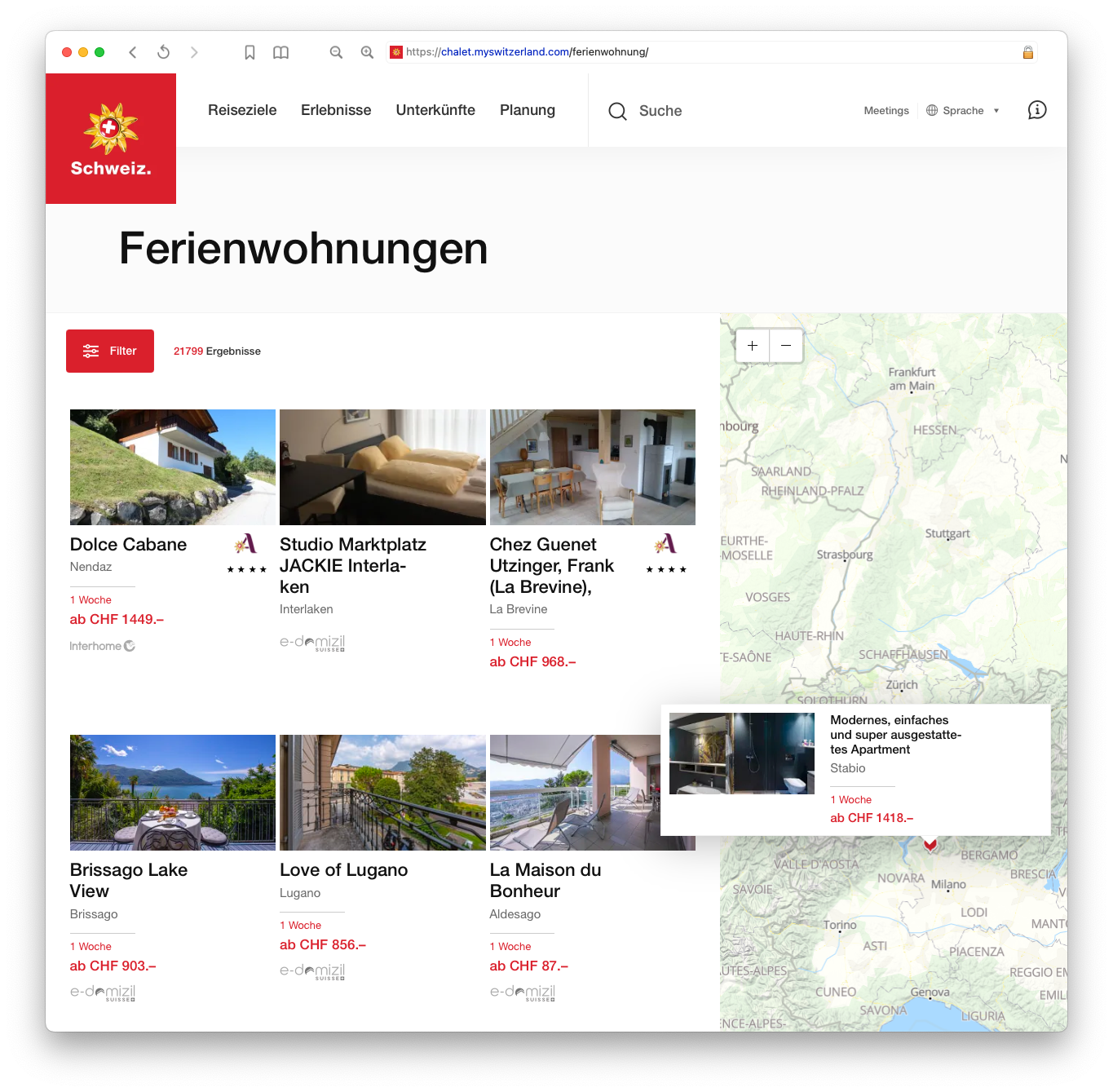
Example of a custom user interface implemented by Switzerland Tourism for MySwitzerland.com
Advantages
- Build your own offer search on top of OpenBooking
- Zero costs for booking provider connection maintenance
- Access every data set in OpenBooking
- Fully documented interface reference
- Build websites and apps
- Get the latest features via API first
- Image processing service license for your custom integration
- Export stock data, regions and availabilities directly into your Website/CMS
Drawbacks
- Building your own interface often leads to additional expenses
- Interface sometimes needs to be adopted to the new features or settings
- New whitelabel features need to be added by your agency
- Usually ready for use after long-term development
Integration Guide
Getting started
The OpenBooking Whitelabel Solution has been designed to enable a modern, user-friendly and fast accommodation search, using modern web technologies and Responsive / Adaptive Design.
During the development, care was taken that the solution can be easily integrated into the customer’s website by still being flexible.
The Whitelabel solution is constantly being further developed and works entirely on the base of our OpenBooking API, so it can be viewed as a reference implementation.
List View
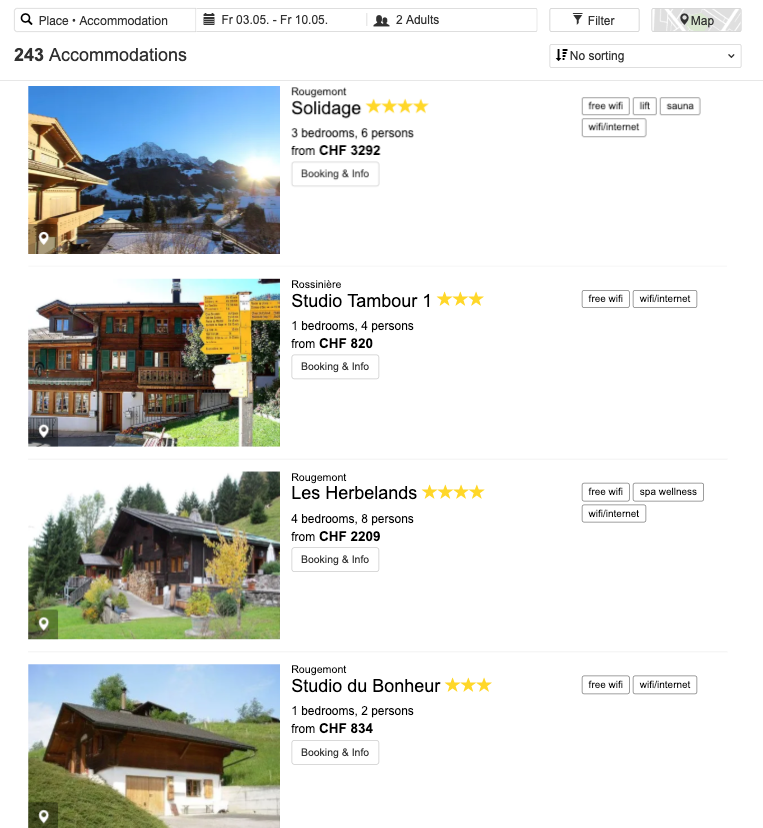
Search Results View
Detail View
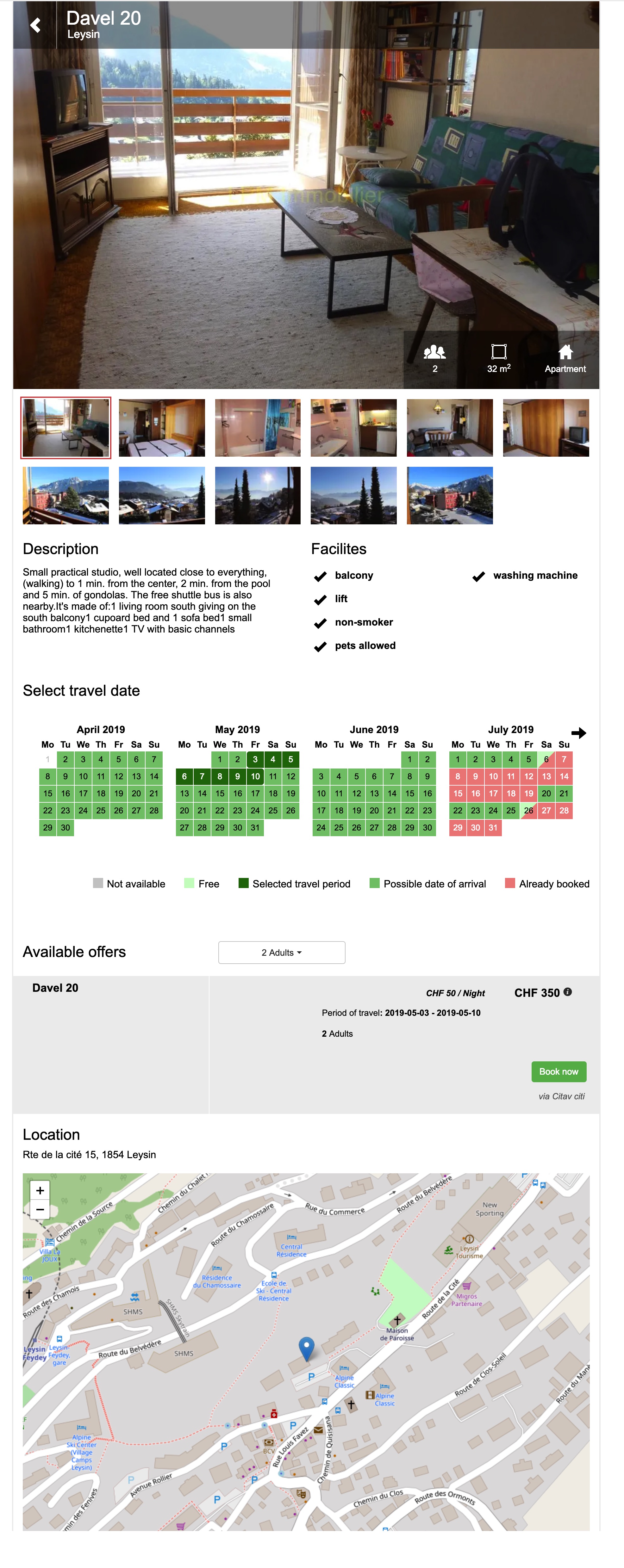
While most Whitelabels use <IFRAME>s, OpenBooking offers the Whitelabel as a full JavaScript-only solution which fully integrates into your website and offers all the advantages of local content like SEO etc.
The Whitelabel is fully hosted at OpenBooking. The following guide describes how to integrate the Whitelabel into your website.
Integration
In order to integrate the OpenBooking Whitelabel solution, a <div> element must be created in the customer’s site, which is given the data attribute data-whitelabel.
HTML-Code
<div
 data-whitelabel
 data-lang = "fr"
 data-group="{YOUR-API-KEY}"
 data-currency = "CHF"
/>

<script src="https://ui.openbooking.ch/ui/v1/server/ob-whitelabel.js"></script>
Using a Config-ID
Instead of configuring the White Label entirely via data attributes, you can create named configurations in the OpenBooking Admin under Settings > White Label Configs. Each config has a Config-ID (e.g. lakeside-summer) that you reference in the embed code:
<div
 data-whitelabel
 data-group="{YOUR-API-KEY}"
 data-config-id="lakeside-summer"
/>

<script src="https://ui.openbooking.ch/ui/v1/server/ob-whitelabel.js"></script>
The config includes all behavioral settings (sort order, TrustYou, contact info, default place, etc.) as well as theming options like a custom primary color. Data attributes and URL parameters still work as page-level overrides on top of the config.
If no data-config-id is provided, the group’s default configuration is used automatically.
Multiple Configurations
You can create as many configurations as you need – for example, one per landing page, campaign, or partner website. Each configuration can have its own:
- Primary color to match different brand identities
- Default Place (Region or City) to pre-select a geographic area in the search
- Behavioral settings such as default sort order, TrustYou reviews, contact info visibility, number of search suggestions, and more
- A unique Config-ID to reference in the embed code
To manage your configurations, go to Settings > White Label Configs in the Admin dashboard. The edit page includes a live preview so you can see how the widget looks with your saved settings.
Example: Multiple landing pages
Create a configsummer-campaignwith a warm primary color and TrustYou reviews enabled, and another configwinter-dealswith a cool color scheme and a different sort order. Embed each on its respective landing page using the appropriatedata-config-id.
Tag-Parameters
The configuration is done using data attributes, the following parameters are available.
| Parameter | Usage |
|---|---|
data-whitelabel |
Must be present for the White Label to work. Required. |
data-group |
Your API key to authenticate the White Label against the OpenBooking API. Required. |
data-config-id |
The Config-ID of a named configuration created in the Admin UI. Loads all settings and theming from that config. Optional. |
data-lang |
Language in which the UI should be displayed. Currently available: de, en, es, fr, it. Default: en. |
data-currency |
The default currency to be used. Currently available: CHF, EUR, USD. Default: CHF. |
data-tracktag |
Default Tracktag, is used if no track tag is defined via the URL API. Can be omitted. May not start with Underscore (_). Maximum of 30 characters. |
data-checkin |
Default checkin, is used if no checkin is defined via the URL API. Parameter is optional. If not specified here and via the URL, the date of today will be used. Format: YYYY-MM-DD. |
data-checkout |
Default checkout, is used if no checkout is defined via the URL API. Parameter is optional. If not specified here and via the URL, the date of tomorrow will be used. Format: YYYY-MM-DD. |
data-adults |
Default adults, is used if no adults is defined via the URL API. Parameter is optional. If not specified here and via the URL, 2 adults will be used. |
data-children |
Default children, is used if no children is defined via the URL API. Parameter is optional. If not specified here and via the URL, 0 children will be used. |
data-prefill |
When true, the search form is populated with the provided dates and guest values but the search is not executed automatically. Default: false. |
data-type |
Show only specified types. Comma-separated list. If not specified here or via the URL, ‘hotel,hostel,apartment,bnb,camping,offer’ will be used. |
data-default_types |
Override the default accommodation types used when no type filter is active. Comma-separated list. Default: hotel,hostel,apartment,bnb,camping,offer. |
data-filter_type |
Restrict the type filter to show only specific accommodation types. Comma-separated list. Default: hotel,hostel,apartment,bnb,camping,offer. |
data-defaultplace |
⚠️ Deprecated – Use a Config-ID with a Default Place set instead. The place used to limit the search range. If set, a second query is made with the fallback place or no limit. |
data-fallbackplace |
⚠️ Deprecated – Use a Config-ID with a Default Place set instead. Used when no accommodations were found for the default place. |
data-masterdataview |
Set to “false” if you do not want to list all accommodations without an availability query. Default: true. |
data-tags |
If provided the White Label will retrieve only accommodations for the specified tags. Pass a comma-separated string. |
data-offset |
Scroll offset (in pixels) to compensate for sticky headers. Provide an integer or the name of a global function that returns an integer. Supports responsive values as a comma-separated list: one value applies to all breakpoints; two values set mobile and tablet (desktop defaults to 0); three values set mobile, tablet, and desktop respectively. |
data-accommodation |
If an accommodation id is provided the whitelabel is directly redirected to the detail page of this accommodation. |
data-showplacesalways |
⚠️ Deprecated – Use a Config-ID with this setting instead. If provided the suggestbar always show the first 5 places even if a user typed in a search key or not. Default: false. |
data-showcontactinfo |
⚠️ Deprecated – Use a Config-ID with this setting instead. If provided the contact details will be displayed on the detail page if an email, street or phone is available. Default: false. |
data-disable_pricechart |
⚠️ Deprecated – Use a Config-ID with this setting instead. Set to “true” to hide the price trend chart on the detail page. Default: false. |
data-layoutfilterfirst |
⚠️ Deprecated – Use a Config-ID with this setting instead. Set to “true” to display the filter panel above the result list. Default: false. |
data-defaultSortOrder |
⚠️ Deprecated – Use a Config-ID with this setting instead. Set the default sort order. Available values: none, quality, price, trustscore, random. Default: none. |
data-enabletrustyou |
⚠️ Deprecated – Use a Config-ID with this setting instead. Set to “true” to enable TrustScore-Widget display in list and detail page. Default: false. |
Full page code example
<!DOCTYPE html>
<html>
  <head>
    <meta charset="utf-8">
    <title>OB-Whitelabel</title>
  </head>
  <body>
    <!--- your header/navigation here etc. --->

    <!-- Whitelabel Solution Div -->
    <div
     data-whitelabel
     data-lang = "fr"
     data-group="{YOUR-API-KEY}"
     data-currency = "CHF"
    />

    <!--- your footer here --->

   <script src="https://ui.openbooking.ch/ui/v1/server/ob-whitelabel.js"></script>

  </body>
</html>
Customization
Theming via Config
The recommended way to customize the White Label’s appearance is through White Label Configs in the Admin UI. Each config supports a Primary Color setting that controls the color of buttons, filter pills, sort indicators, and other interactive elements.
Create a config in Settings > White Label Configs, set your desired primary color, and reference it via data-config-id. If you set the primary color on the default config, it applies to all embeds automatically.
CSS Classes
The White Label basecontainer with the classes bootstrap-pxl and openbooking-whitelabel-pxl has a predefined zindex of 99.
For layout-level overrides (max-width, positioning) that theming variables can’t cover, use the custom CSS classes below. These can be written to your CSS file and configured individually.
The following CSS custom-style classes are currently available:
| Class | Usage |
|---|---|
.ob-custom-search-container |
Is attached to the upper search-bar’s <div> |
.ob-custom-main-container |
Is attached to the <div> with the result list and the filter |
.ob-custom-detail-container |
Is attached to the detail page’s main <div> |
.ob-custom-btn |
Is attached to all buttons |
.ob-custom-btn--filter |
Is attached to the filter button inside the navbar |
Examples
Use case: restrict the size of all whitelabel elements to a certain width (i.e. 960px):
.ob-custom-search-container,
.ob-custom-main-container,
.ob-custom-detail-container {
  max-width:960px;
}
⚠️ Bad practice
While you can technically overwrite any CSS class in out White Label, we advice you to only use the classes documented above. Undocumented CSS are subject to change any time. If you are in need of a special customization, please get in touch with us and we will find a solution.
Build your own search forms
You can pass values via URL query parameter. For example, to enable quick-booking forms. We have implemented an URL API, which sets the corresponding search parameters if they are valid (parameters are validated beforehand).
Supported URL parameters
| Parameter | Usage | Example |
|---|---|---|
checkin |
Check-in date in the format YYYYMMDD. | &checkin=20160701 |
checkout |
Check-out date in the format YYYYMMDD. | &checkout=20160703 |
adults |
Number of adults. | &adults=2 |
children |
For every child, pass the age as a comma-separated list. If you do not know the ages, pass “12” as a default. If no children are specified, you may omit the field or send it empty. | &children=4,12 |
prefill |
When set to “true”, prefill the search form with the provided parameters without executing the search. Default: false. | &prefill=true |
tag |
Track tag. Overwrites the default track tag defined in “data-tracktag”. May not start with underscore (_). Optional. Max 30 characters. | &tag=minibookform |
language |
Overwrites the default language defined in “data-lang”. | &language=fr |
currency |
Overwrites the default currency defined in “data-currency”. | ¤cy=EUR |
type |
Overwrites the default type defined in “data-type”. | &type=apartment,bnb |
place |
Filter results by one or more places or regions. Repeat the parameter to combine multiple places — results will match any of the specified places. | Single: &place=zermattMultiple: &place=gr-arosa&place=gr-lenzerheide |
fallbackplace |
Overwrites the default fallback place defined in “data-fallbackplace”. | &fallbackplace=Valais |
enabletrustyou |
Enable TrustScore widget display in list and detail page. | &enabletrustyou=true |
tags |
Overwrites the tags specified by “data-tags”. Comma-separated list. | &tags=familyfriendly,campaign2025 |
stars |
Filter results by their star rating. | &stars=5,4,3 |
features |
Filter results by features (slugs from the OpenBooking Admin). Use a comma-separated list; URL-encode names that contain spaces or slashes. | &features=parking,bar-lounge,sauna-turkish-bath |
sort |
Set the sort order. Available values: none, quality, price, trustscore, random. | &sort=price |
grouping |
Group results by specified fields. Comma-separated list. | &grouping=type |
showplacesalways |
If provided, the suggest bar always shows the first 5 places even if a user typed a search key or not. | &showplacesalways=true |
room |
Add one or more rooms. The first value is the number of adults; the following values are the ages of the children. | Add one: &room=2,5,8Add multiple: &room=2,5,8&room=1,9 |
hs |
Hide the search box when set to “1”. | &hs=1 |
Note that the search will only be executed if:
- at least checkin, checkout and adults are specified and valid
- prefill is not set to true
💡 Passing values from an external form
If you build you own search form, you must set themethod="GET"
attribute in the<FORM>tag to pass the values via URL. Otherwise parameter passing will not work.
Ready!
Now, you’re all set.
We continuously extend the functionality of our Whitelabel UI. Please do not hesitate to send us your feedback or ideas, on how to make it better.